Only 1 in 4 first emails ever get a reply.
You already know this, because you have sent yours. Now the inbox sits silent, and you are wondering whether to nudge again or move on.
I do not blame you. Follow-ups are the part of outbound that most people get wrong.
In this guide, I will show you how to write a follow-up email that actually gets a reply.
You will get the timing, the structure, 8 templates, and how to send at scale.
Let's get into it.
A follow-up email is a short reply sent 2 to 3 business days after your first message. You reply in the same email thread, keep it under 100 words, and ask one clear question. Space each follow-up further apart than the last, and cap the sequence at 3 to 5 touches.
A follow-up email is any email sent after your first message to move the conversation forward. It might chase a reply, confirm a next step, or share extra context.
Every industry uses them. Sales reps send them to prospects. Recruiters send them to candidates. Freelancers send them to clients waiting on invoices. Founders send them to investors after a pitch.
In outbound sales, the follow-up is where most of the pipeline actually gets built. First emails get most of the credit. Follow-ups do most of the work.
A single email pulls a reply rate around 4 to 5 percent on average. A three-step sequence pushes that closer to 15 to 20 percent when the touches are well-timed and well-written.
That is why treating the follow-up as an afterthought is one of the biggest mistakes in cold outbound. If your first email did not work, your follow-up is not a repeat. It is a second chance.
The first email lands in a busy inbox. The reader has 100 other messages, and yours competes with every one of them. Even a strong email gets buried by the end of the day.
The follow-up catches the reader in a different moment. Maybe they have cleared through Monday's chaos. Maybe they saw your first message and meant to reply but forgot.
The nudge gives them a reason to come back. That is why the second and third emails in a sequence often outperform the first.
Not every follow-up serves the same purpose. Here are the five I run most often.
Each one uses the same underlying structure. The context and tone shift, but the shape stays the same.
The right time to send a follow-up is the second decision most people get wrong. Send too soon, and you look impatient. Send too late, and the reader has forgotten the original message.
Here is the cadence I follow across most outbound campaigns.
The spacing widens on purpose. Early nudges keep the thread warm. Later nudges give the reader breathing room, so the sequence never feels like harassment.
For gentle reminder emails to colleagues, warmer leads, or job applications, I use a lighter cadence.
Wait 5 to 7 business days on the first nudge, and stretch from there.
Most guides tell you to wait 2 to 5 days. In my experience, 2 to 3 business days is the sweet spot for cold outbound. It respects the reader's schedule without letting the original message fall out of memory.
A follow-up sent on the fifth day often gets a reply that starts with "Sorry, I missed this." A follow-up sent on day two lands while the first email is still fresh in the reader's mind.
If you need to time nudges more precisely for different scenarios, I break down the exact windows in my full guide on when to follow up after no response.
Three to five is the range I stick to. Anything under three leaves easy replies on the table. Anything over five turns into noise.
Data backs this up. A single email pulls a reply rate near 5 percent. Sending three well-timed follow-ups can push total sequence reply rates above 20 percent.
Past the fourth touch, the marginal gains flatten fast.
The exception is the breakup email. Even after four ignored messages, a well-written breakup can outperform every other touch in the sequence. People respond when you give them permission to walk away.
The rules that make a follow-up work are the same rules that make any short email work. Keep it brief. Make one specific ask. Reference the context so the reader does not have to hunt for it.
Here is the exact 5-step process I use.
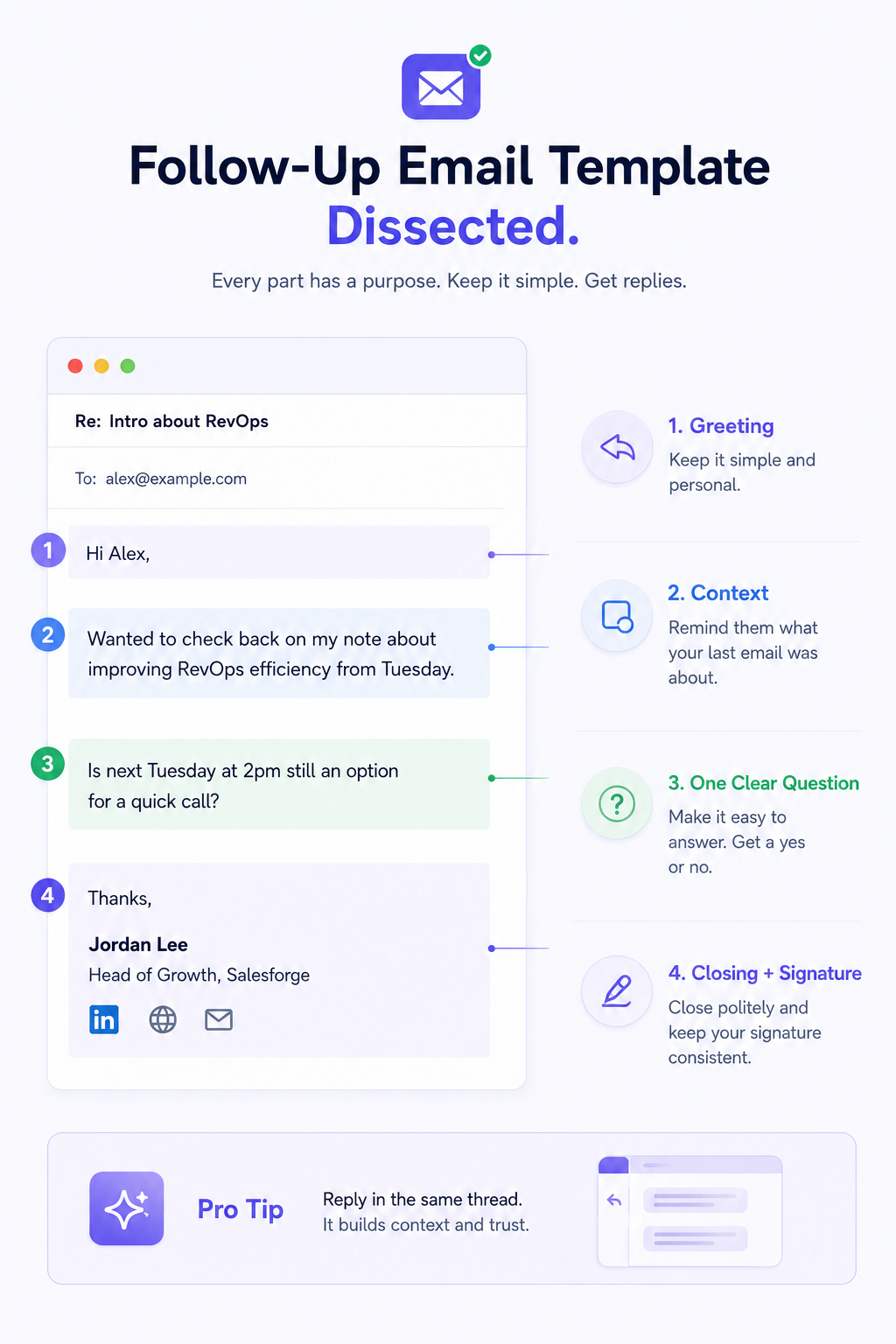
Do not start a fresh email. Hit reply on the original message, so the whole thread sits below your new note.
This does three things at once. It gives the reader instant context, and it signals continuity as a real conversation. It also keeps the whole exchange searchable in their inbox.
If you started a new thread every time, you would look scattered. Threaded replies look like a real conversation instead of a scattered outreach effort.
The subject line handles itself when you reply in the same thread. Your email inherits the original subject with a "Re:" prefix. That works fine.
Do not overwrite it with something like "Follow-up" or "Just checking in." Those lines add nothing and often trip spam filters.
If you must write a new subject line, keep it short and specific. Something like "Following up on [topic]" or "Re: [original subject]" is enough. If you want deeper subject line inspiration, I keep an updated list of 30 cold email subject lines that pull opens.
Do not start with "Just circling back." The reader knows you are following up. What they need is a reminder of why.
Give them the context in one sentence. Something like "Wanted to check back on my note about [topic] from Tuesday" does the heavy lifting. It tells the reader what the email is about, when they got the last one, and why they should care.
Skip the throat-clearing. Get to the point in the first line.
The single biggest mistake I see in follow-ups is stacking three asks in one email. It confuses the reader and gives them a reason to reply later. And later usually means never.
Pick one question and make it easy to answer. Something like "Is next Tuesday at 2pm still an option for a quick call?" works well. So does "Would you like me to send over the case study I mentioned?"
Any single question works. Three questions at once do not.
Skip "Looking forward to hearing from you." It reads like filler. A simple "Thanks" or "Appreciate it" lands cleaner and shows you respect their time.
Match the signature from your first email. Same name, same title, same links. This reinforces the thread as one continuous conversation instead of a scattered outreach.
Templates are the starting point, not the final draft. Every one below needs a personalization pass before it goes out. Swap the bracketed variables. Rewrite one sentence in your own voice. Then send.
For more first-touch inspiration, my full cold email templates library covers 10 opening emails that pair with the follow-ups below.
Use this when your first cold email got silence. It reopens the loop without pressure and gives the prospect a low-friction reason to engage.
Use this within 24 hours of a discovery call. It locks in what you agreed on while the conversation is still fresh and confirms the next step so momentum does not die.
Use this 3 to 5 days after sending a quote or proposal. It nudges the buyer without pressure and offers to remove any friction that is stalling the decision.
Use this as the final touch in a sequence, after 3 or 4 ignored emails. It gives the prospect a graceful exit, and counterintuitively, it often pulls the highest reply rate of the whole sequence.
Use this within 48 hours of meeting someone at a conference, meetup, or industry event. It anchors the conversation to a specific moment so the recipient actually remembers you.
Use this within 24 hours of a job interview. It shows genuine interest, reinforces the strongest moment of the conversation, and keeps you top of mind while the hiring team is deciding.
Use this with a colleague, vendor, or client when a project is stalling. It moves things forward without finger-pointing and offers to unblock whatever is stuck.
Use this 2 to 6 months after a prospect went cold. It gives you a legitimate reason to reach back out by anchoring to something new since the last conversation.
If you are sending 5 follow-ups a week, writing each one by hand works fine. If you are running outbound at any real volume, the manual approach breaks fast.
I have run cold outbound with a single inbox and a spreadsheet, and I have run it across 20 mailboxes with automated sequences. The difference is not effort. It is what breaks and how quickly.
At real volume, three problems show up.
The only fix is a tool that runs the cadence for you, keeps sending stable across many mailboxes, and pulls every reply into one place. That is what Salesforge is built for, and it is the platform I use to run follow-ups at scale.
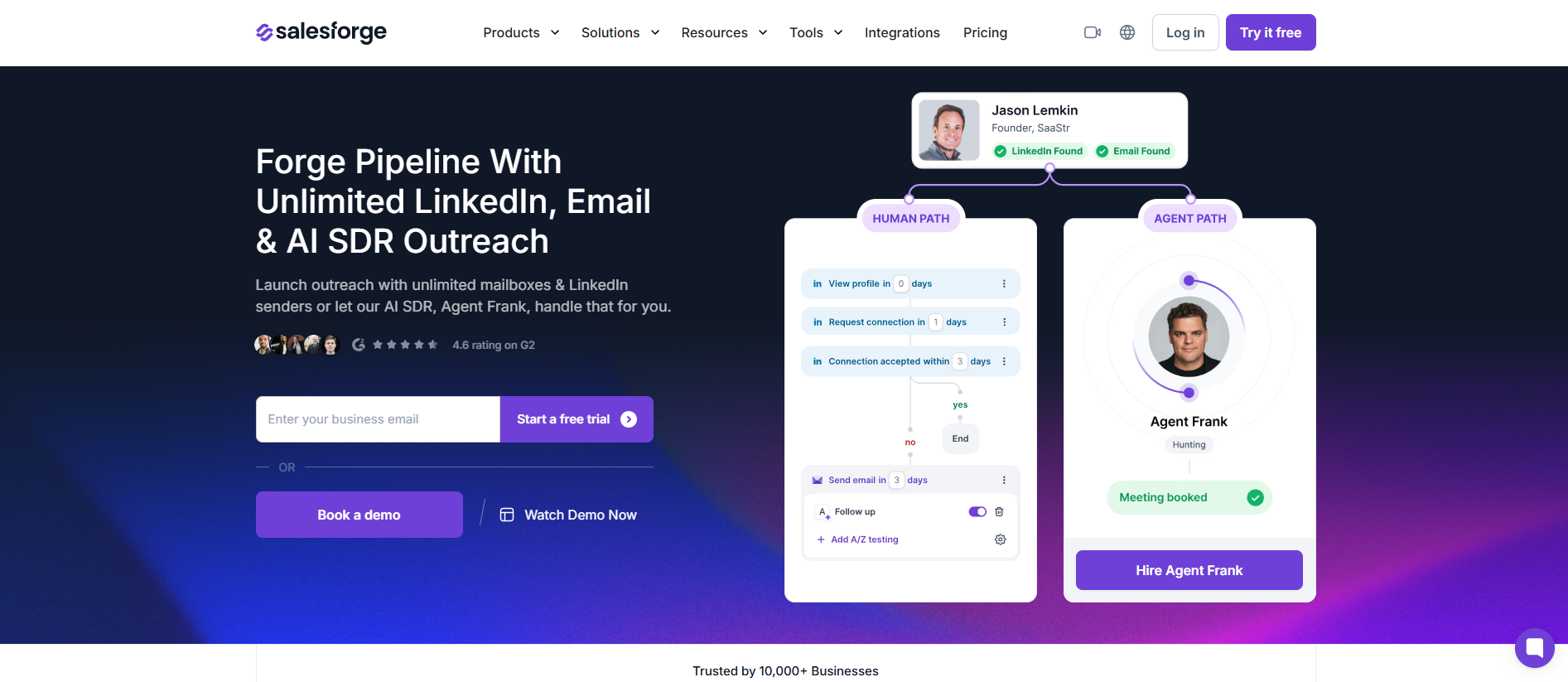
Here is why Salesforge is the best tool for sending follow-up emails today.
For a wider tool comparison across follow-up software, I ranked the best email follow-up software tools.
And if you want to combine email with LinkedIn touches in the same sequence, my guide on multichannel outreach covers exactly how the two channels compound reply rates when run together.
Small mistakes shrink big pipelines. Avoid these six if you want your follow-ups to actually get read.
If you want more tactical fixes, my 10 cold email follow-up hacks breaks each one down further.
The truth about follow-up emails is that they are simple, but simple is not the same as easy. Writing one takes five minutes. Building the discipline to send them consistently, on the right cadence, across every prospect is the hard part.
Here is what I want you to take away.
The first email opens the door. The follow-up walks through it. Most of the pipeline you will build this quarter sits in the follow-ups you have not sent yet.
Reply in the same thread. Keep it under 100 words.
Ask one clear question. Space your nudges further apart each time.
Cap the sequence at 3 to 5 touches, and end with a breakup that gives the prospect a way out.
Do that consistently, and your reply rates will climb without changing a single thing about your first email.
If you want to run this at scale without letting a single follow-up slip, that is what Salesforge is built for. You get sequences that never miss a send window, unlimited mailboxes that protect your deliverability, and a unified inbox that catches every reply from every channel.
Start a free 14-day trial with Salesforge
Or hire Agent Frank if you want the entire follow-up motion running on autopilot while you focus on the calls that close.
Either way, go write that follow-up email. You know the one I mean. The one you have been putting off since Monday.
Reply in the same thread 2 to 3 business days after your first message. Keep the note under 100 words, reference the original context in one line, and ask one clear question.
Do not lead with "Just checking in" or "Per my last email." Both read as passive-aggressive to the reader.
Three to five is the standard range for cold outbound. Anything under three leaves easy replies on the table, and anything over five reads as noise.
The final touch should be a breakup email that gives the prospect a graceful way to say no.
Tuesday through Thursday between 9 AM and 11 AM in the prospect's time zone is the highest-response window for most B2B audiences. Avoid Monday mornings, when inboxes are overloaded, and Friday afternoons, when inboxes are checked out.
If your platform supports it, use time-zone-aware sending so every follow-up lands in the prospect's morning, not yours.
Both, if you can. A LinkedIn touch often catches a prospect who ignored three emails, because it hits a different channel and a different inbox.
The strongest sequences alternate between the two. Start with email, add a LinkedIn connection request on day 5 or 7, and use LinkedIn messages for later touches when email has gone cold.
Yes, you should. One follow-up is rarely enough on its own.
A single email pulls a reply rate around 5 percent. A three-step sequence with well-timed follow-ups can push that above 20 percent.
The mistake is not sending multiple follow-ups. It is sending them too close together or with no new angle.
The best move is to reply in the same thread and let the "Re:" prefix handle it. If you must write a new subject line, keep it short and specific.
"Following up on [topic]" or "Should I close the file on this" both work well. Avoid vague lines like "Just checking in" or "Quick question."


.jpg)

![How to Use Jev for Cold Email Agents [Step-by-Step Guide]](https://cdn.prod.website-files.com/6436c3ac9f9fd0594d00b9fc/6acbd25fa19716f481a8dc43_Duplicate-me-open-graph%20(67).jpg)


