Every few days, someone tells me cold email is dead, or that it is just spam with a nicer font. I understand why they say it.
Plenty of genuine junk shows up in any given week, and a lazy cold email is hard to tell apart from it. But the two are not the same thing, and treating them as the same is how good outreach gets buried in the junk folder alongside the real garbage.
I have spent years watching which messages land and which ones get rejected, and the pattern is consistent. Cold email fails when it starts behaving like spam: no targeting, no relevance, no sending discipline. It works when it does the opposite. This guide walks through the real difference, the legal side, how inbox providers judge you in 2026, and the practical steps that keep a legitimate message out of the spam folder.
Cold email and spam get lumped together, but they behave differently, and inbox providers treat them differently. Here is the short version.
The difference is not the software, the send button, or the word unsolicited. It comes down to intent, relevance, and behavior.
A cold email is a one-to-one message I send to a specific person I have not spoken to before, because they fit a clear profile and I have a real reason to reach out. It reads like an introduction at a conference: unsolicited, yes, but relevant and purposeful. Spam is the opposite. It is high volume, generic, and sent to whoever happens to be on a list, with no thought about whether the recipient is a fit.
Here is the test I use. If I cannot explain in one sentence why this exact person is getting this exact message, it is not cold email. It is a blast. And a blast, no matter how it is dressed up, is what filters and recipients read as spam.
Spam is a behavior pattern, not a category of sender. Understanding the pattern is the first step to avoiding it.
Classic spam is built on a few traits. It uses purchased or scraped lists full of unverified addresses. It sends the same generic message to thousands of people at once. It often hides who the sender is, uses misleading subject lines, and has no working way to opt out. In the worst cases, it exists to trick people, spread malware, or push a scam, which is why filters treat the whole shape of that behavior as hostile.
The label sticks because recipients decide it, not senders. When enough people mark a message as spam, the inbox provider learns the pattern and starts rejecting anything that looks similar. This is the part that trips up honest teams: you do not have to intend to spam anyone to get flagged as a spammer. If your sending looks like a blast, you inherit the blast's reputation.
That is why sloppy cold email is dangerous. Bad data, no personalization, and reckless volume produce the same signals as real spam, and the filters cannot read your intentions. They can only read your behavior.
Four things move a message from blast to legitimate outreach. Miss any one of them and the message drifts back toward spam.
A cold email goes to someone who matches my ideal customer profile. I have vetted the contact, I know their role, and I can explain why the message is relevant to them right now. Spam skips this entirely and sends to anyone with an address.
Real personalization is not just a first name in the greeting. It references something specific: the person's role, a recent company event, or a problem I noticed they are likely facing. If I want to see how the whole message comes together, my guide on how to write a cold email walks through the structure. Spam feels like a mail merge gone wrong, where every field could be swapped for anyone.
Cold email is unsolicited, but it is not lawless. It relies on legitimate interest and honest identification, and it always gives the recipient a clean way to opt out. Spam ignores consent completely, which is the line I cover in the legal section below.
Cold email uses a warmed sender, a steady cadence, verified addresses, and clean authentication. It behaves like a person, not a machine firing at full volume. Spam behaves like a machine, and inbox providers are very good at spotting the difference. Getting this part wrong is one of the most common cold email mistakes I see teams make.
If you want the difference in one snapshot, here is how the two compare across the dimensions that matter to both recipients and filters.
Cold email is legal in most markets when it follows the rules. The rules are not complicated, but skipping them is what turns outreach into a liability.
Under CAN-SPAM, commercial email is allowed even without prior opt-in, as long as I identify myself honestly, use a truthful subject line, include a real physical business address, and give a working way to unsubscribe. Opt-out requests have to be honored promptly. Notice that CAN-SPAM does not ban cold email. It bans deception and forced contact.
In the EU and UK, most B2B cold email relies on the legitimate interest basis under GDPR. To stand on that basis, I keep the outreach genuinely relevant to the person's professional role, I contact them at their work address rather than a personal one, and I give a clear opt-out. Legitimate interest is a real legal footing, not a loophole, but it only holds if the message is actually relevant to their job.
Rules vary elsewhere, and some markets lean stricter. As a general habit, I treat business contact data with care everywhere: use it for the purpose it was gathered, honor deletion requests, and keep the message professional and relevant. Spam fails all of these tests at once, which is a large part of why it is treated as spam in the first place.
Modern filters do not read your intentions. They score your behavior, your reputation, and your setup, then decide before the recipient ever opens the message.
In 2026, Google, Yahoo, and Microsoft do not just sort questionable mail into a junk folder. For senders that look like bulk operators, they reject messages outright. That raises the stakes, because one bad setup can pull your ordinary business email down with your outreach.
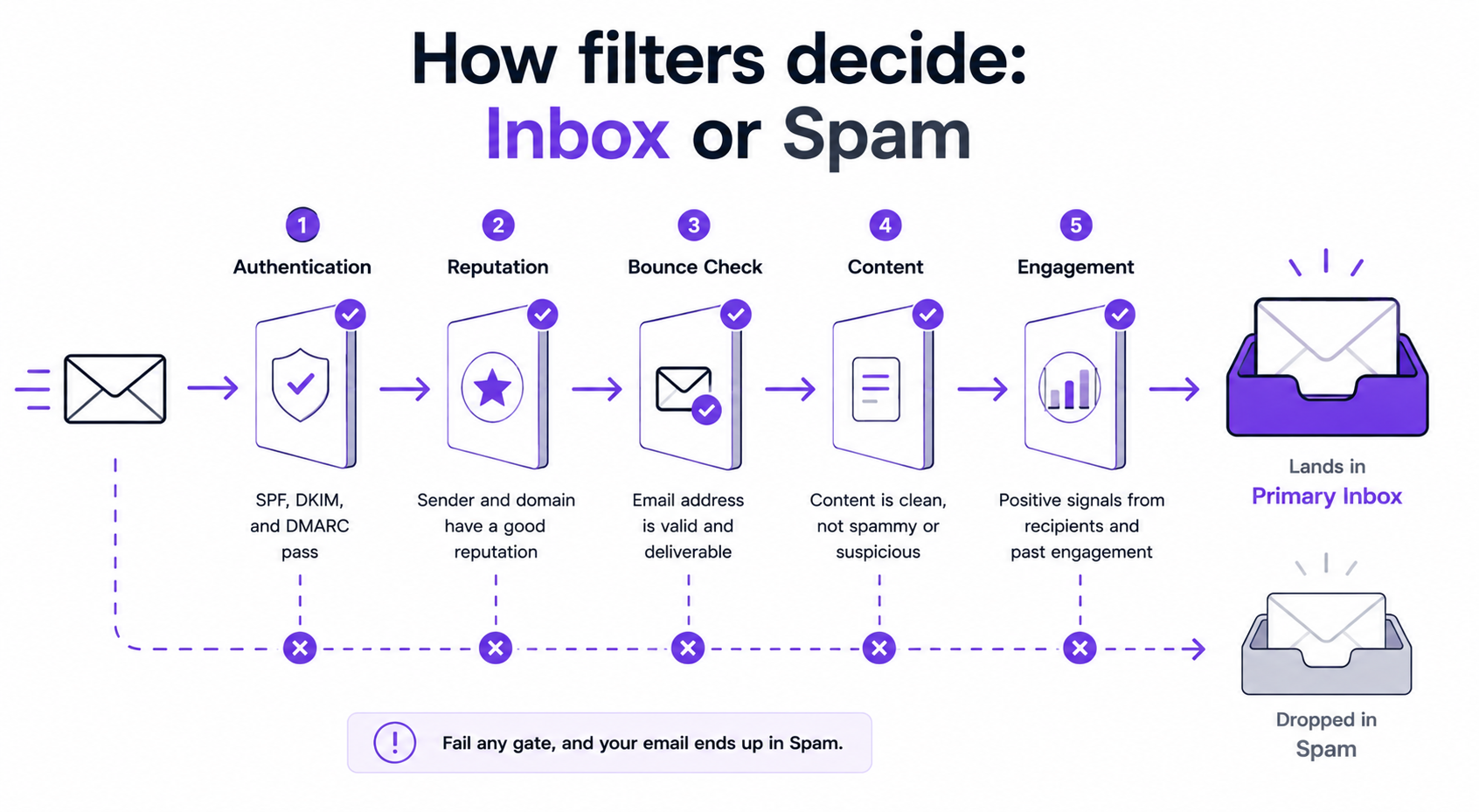
The signals that decide your fate cluster into a few buckets:
None of this is about whether you meant well. It is about whether your sending pattern looks like a trustworthy human or a machine at full throttle. If you want to sanity-check your copy before you send, the free spam checker scans for the triggers that hurt placement, and the broader topic of email deliverability is worth understanding end to end.
The single fastest way to look like spam is to send to the wrong people. The single fastest way to look like a peer is to reach the right ones at the right moment.
Spam is defined by its indifference to the recipient. So the first defense against looking like spam is targeting that is sharp enough to justify every send. This is where I lean on Leadsforge, the lead finder in the Forge Stack, with a database of 500M+ B2B leads. Instead of stacking filters, I describe the ideal customer in plain language and get a matching list back, then let waterfall enrichment pull verified emails and phone numbers from multiple data sources so I am not sending into the dark.
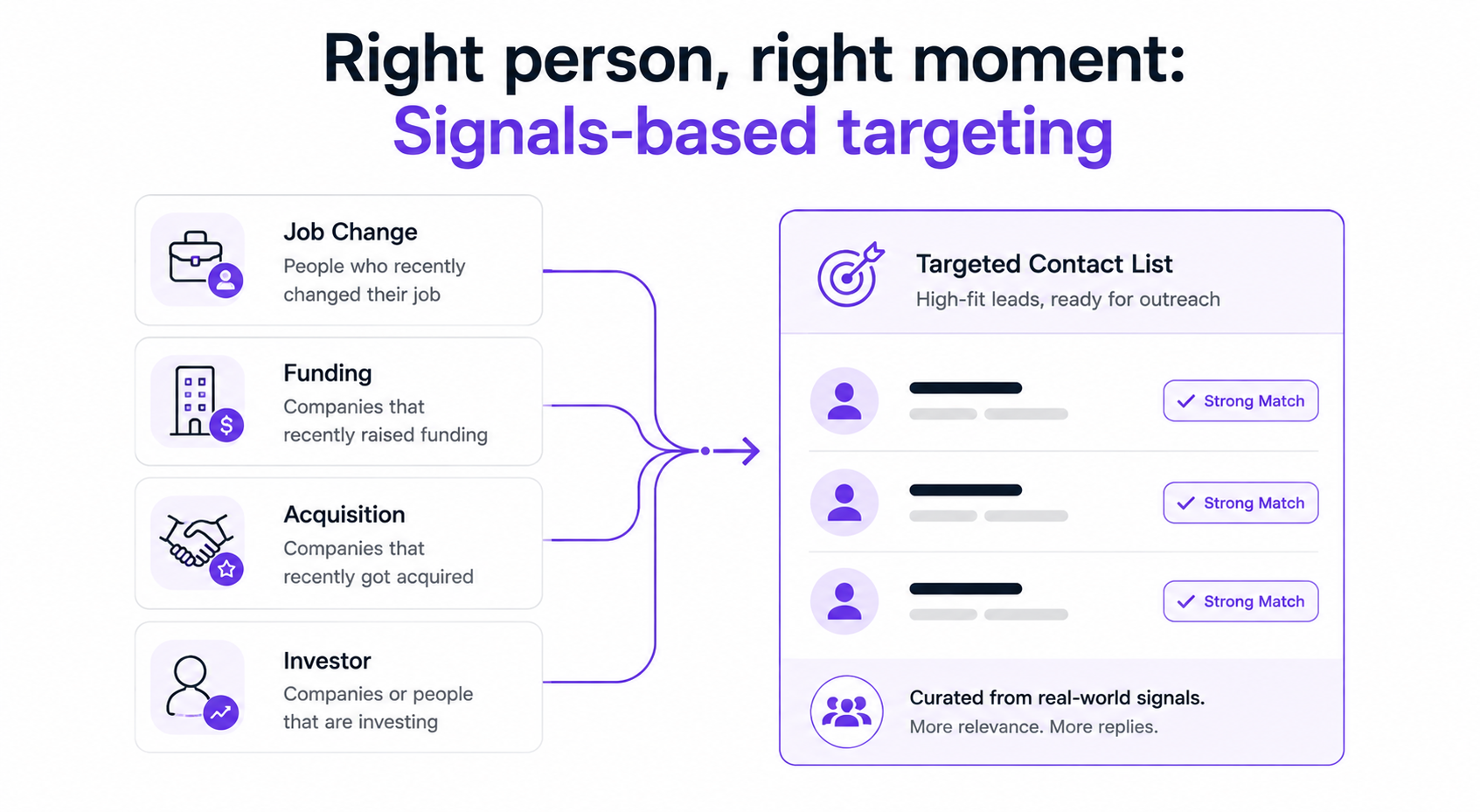
Relevance is not only about who someone is. It is about when I reach them. Leadsforge recently added Signals, a sourcing path that builds lists around real-world events instead of static ICP criteria. I can target companies and people based on intent signals like job changes, funding rounds, acquisitions, and new investments, then filter each signal by location, industry, company size, and role.
What makes Signals matter for the cold email versus spam question is timing and proof. Every match comes with supporting evidence from public sources that explains why the company or person surfaced, so I can open the message on something that is genuinely current. Reaching a founder the week after a funding round, with a message that references that round, is the exact opposite of a generic blast. It is the most relevant a cold email can be, and relevance is what keeps it out of the spam bucket.
Because Leadsforge feeds Salesforge directly, that targeted list moves into a sequence in the same environment, with no CSV export in the middle. The result is that targeting and sending are one motion instead of two disconnected tools stitched together.
Even a perfectly targeted, well-written message lands in spam if the infrastructure behind it is weak. Deliverability is where good outreach is won or lost.
This is the part most people underestimate. The copy can be excellent, and the list can be clean, but if the sender is unwarmed, the volume is reckless, or the addresses are unverified, filters will still treat it like a blast. I run cold email through Salesforge specifically because the deliverability controls are built in rather than bolted on, and they map almost one-to-one onto the signals filters care about.
Spam never expects an answer. Cold email is built to earn one, which means how you handle replies is part of the difference.
A real conversation is the clearest signal to an inbox provider that your mail is wanted. When people reply, and I reply, engagement climbs and reputation improves. That is why I keep every response in one place with Primebox, the unified inbox that pulls email and LinkedIn replies together. Auto-Pilot can handle routine replies end to end, and Co-Pilot drafts responses for me to approve before they go out, so nothing slips through when volume picks up.
The point is that cold email is a two-way motion. Spam is a one-way dump. Building the conversation loop into the workflow keeps outreach on the right side of that line, and it is one reason the under one roof model of the Forge Stack works: lead finder, warmup, sending, and reply management sit in one environment instead of four disconnected tools. That same stack can run three ways, whether my own team operates it, Agent Frank runs it as an autonomous AI SDR, or a Forge Expert agency runs it for me.
Here is the routine I run so a legitimate cold email keeps behaving like one, in order.
Run every one of these and cold email stops looking anything like spam, to your prospects and to the filters. If you want the tooling that handles most of this automatically, that is what cold email software is for.
Cold email and spam are not two words for the same thing. They are opposite behaviors that happen to share a delivery channel. Spam is indifferent: any list, any inbox, any volume, no consent. Cold email is deliberate: the right person, a real reason, a warmed sender, and a clean opt-out.
The reason this matters more in 2026 than it did five years ago is that inbox providers now enforce the line for you. Get targeting, consent, and deliverability right and your outreach reads like a message from a knowledgeable peer. Get them wrong and you inherit the spam label whether you deserve it or not.
What keeps me on the right side of that line is not willpower, it is the setup. Relevant targeting through Leadsforge and its Signals sourcing, and a deliverability stack in Salesforge with free warmup, ESP matching, Bounce Shield, sender rotation, and built-in validation, all in one place. That combination is the practical difference between cold email that works and mail that never reaches a human.
1. Is cold email the same as spam?
No. Cold email is a targeted, personalized message sent to a specific person who fits your ideal customer profile, for a reason you can explain. Spam is generic, high-volume mail sent to unverified lists with no targeting or consent. They share a channel, but the behavior is opposite, and inbox providers treat them very differently.
2. Is cold email legal in 2026?
Yes, in most markets, when it follows the rules. In the US, CAN-SPAM allows cold email if you identify yourself honestly, use a truthful subject line, include a physical address, and offer a working unsubscribe. In the EU and UK, most B2B cold email relies on the legitimate interest basis under GDPR, which requires the message to be genuinely relevant to the recipient's professional role and to include a clear opt-out.
3. How do spam filters tell cold email from spam?
They score behavior, not intent. Filters check authentication (SPF, DKIM, DMARC), sender reputation, complaint and bounce rates, content patterns, and engagement. A warmed sender, verified list, plain copy, and steady cadence read as legitimate. An unwarmed sender, dirty list, heavy HTML, and reckless volume read as spam, regardless of what you intended.
4. Can a legitimate cold email still land in spam?
Yes. Even a well-targeted, well-written message lands in spam if the infrastructure is weak: an unwarmed mailbox, missing authentication, a high bounce rate, or reckless volume. That is why deliverability tooling matters. Warmup, ESP matching, sender rotation, and email validation exist to keep good messages from inheriting spam signals.
5. How many cold emails can I send before it looks like spam?
There is no single number, but the pattern matters more than the count. Firing a large volume from a single unwarmed mailbox all at once looks like a blast. Spreading a steady volume across warmed, rotated mailboxes with a human cadence looks legitimate. Sender rotation and warmup let you scale without tripping bulk-sender thresholds.
6. Does personalization keep cold email out of spam?
It helps, but only real personalization. Inserting a first name into a template is not enough, since filters detect templated language. Referencing the person's role, company, or a recent event, ideally tied to an intent signal like a funding round or job change, makes the message relevant and reads as human rather than machine-generated.
7. What is the fastest way to check if my cold email looks like spam?
Run your copy through a spam checker to catch trigger phrases and heavy formatting, verify your list before sending, and run an inbox placement test to see where messages actually land across Gmail and Outlook. Fixing authentication and warmup issues before the first campaign is the highest-impact step.
.jpg)

.jpg)
.jpg)


