I have launched cold campaigns from brand-new mailboxes, and I have watched those same mailboxes get throttled inside a week.
The difference every time was the warm-up.
In 2026, inbox providers will judge new senders harder than ever. A fresh domain that starts sending cold volume on day one appears to be a spam operation, and it is treated accordingly.
Warmup is how you avoid that. It builds sender reputation slowly, with real inbox activity, before your first real prospect ever sees your name.
This guide covers what email warmup is, how long it takes, the exact steps to warm up right in 2026, and the mistakes that quietly sink deliverability. Here is the short version first.
The fast answer if you only read one section.
Warmup is the process of building trust with inbox providers before you send a single cold email.
Email warmup means sending and receiving small volumes of friendly, human-looking email from a new mailbox, then increasing that volume slowly over time.
The warmup emails get opened, replied to, and moved out of spam. Those actions tell Gmail, Outlook, and Yahoo that a real person owns the mailbox.
Do it long enough, and the provider starts trusting your domain. That trust is what lands your cold emails in the primary inbox later.
Skip it, and the provider has no history to read. A brand-new mailbox sending fifty cold emails on day one is the fastest route to the spam folder.
The rules for reaching the inbox got stricter, and warmup is how you stay on the right side of them.
Google and Yahoo set shared sender rules that took effect in early 2024. Microsoft followed with its own enforcement in 2025.
The baseline is simple. Any domain sending around 5,000 or more emails a day to a provider is treated as a bulk sender, and that label sticks even if your volume later drops.
Bulk senders must authenticate every message with SPF, DKIM, and DMARC. Marketing mail needs a one-click unsubscribe. Miss these, and messages get rejected at the door, not just filtered to spam.
There is a hard number that ends every deliverability argument. Keep your spam-complaint rate under 0.1 percent, and never let it touch 0.3 percent.
Cross 0.3 percent and providers stop helping you. Your mail gets throttled, demoted to the Promotions tab, or dropped into spam.
Late in 2025, Google moved non-compliant traffic from temporary rate-limit warnings toward permanent rejections. The enforcement grew teeth.
Warmup does not replace authentication, but it earns you the reputation the new rules assume you already have.
A warmed mailbox has a track record of positive engagement. When your cold volume starts, the provider reads it against weeks of good behavior instead of a blank slate.
Compliant, warmed senders in 2026 reach the inbox far more often than cold-start domains. The gap between the two is wider than it has ever been.
There is no universal number, but there is a safe range and a clear signal for when you are ready.
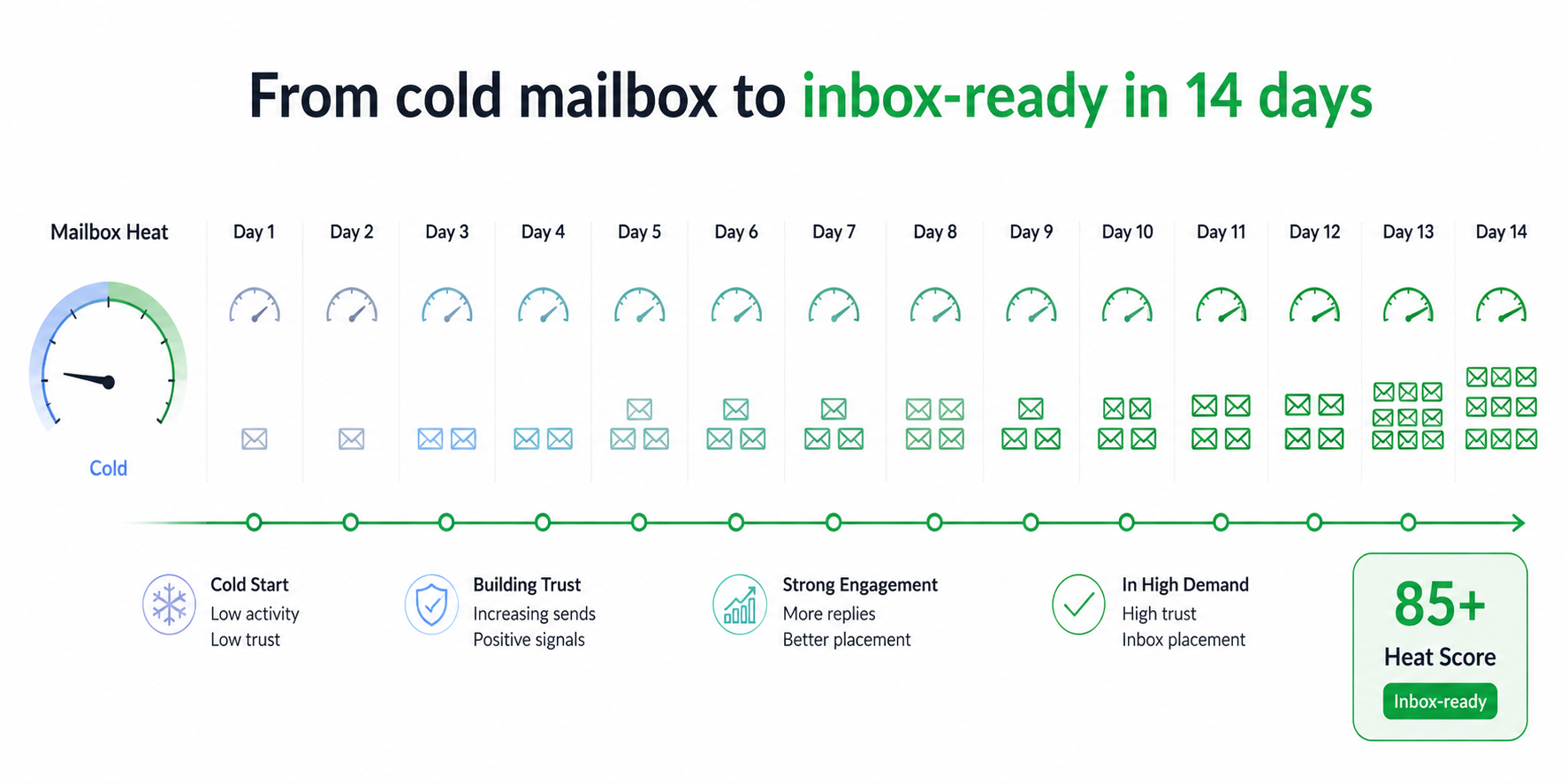
Two weeks is the practical floor for a new Google Workspace or Microsoft 365 mailbox. Many operators run three to four weeks before touching real prospects.
Older domains warm faster than brand-new ones. Higher target volume needs a longer ramp.
A better guide than any calendar is your mailbox health score. When your Heat Score™ sits at 85 or above, the mailbox is ready to send.
Warm-up is also never fully finished. The strongest senders keep a low level of warm-up running under their live campaigns for good.
Five steps take a cold mailbox to inbox-ready, in order.
Warmup only works on a mailbox that providers can verify.
Before any warmup starts, set up SPF, DKIM, and DMARC on your sending domain. These records prove the mail is really from you.
In 2026, this is not optional. Providers reject unauthenticated bulk mail outright.
Add a custom tracking domain and valid reverse DNS while you are in there. Then confirm the records resolve. A free email deliverability test or blacklist checker verifies the basics before you spend two weeks warming.
Manual warmup is possible, but automation is what keeps it consistent.
A warmup engine sends and receives natural-looking email on your behalf, every day, without you touching it.
Good engines use a pool of real, aged mailboxes so the conversations look human. They open your warmup mail, reply to it, and pull it out of spam when it lands there.
Connect your Google Workspace or Microsoft 365 mailbox, switch warmup on, and let it run. Warmforge does this in one click and works with Google and Outlook mailboxes out of the box.
The whole point of warmup is a slow, believable increase in volume.
Begin with a handful of warmup emails a day per mailbox. Add a few more each day.
A steady climb looks like a real person growing their correspondence. A sudden spike looks like a spammer, and providers treat it that way.
Let the tool manage the ramp on its recommended settings. Resist the urge to rush the schedule to hit a launch date.
A simple ramp for a single mailbox looks like this:
Warmup without measurement is a shot in the dark, so watch the numbers that matter.
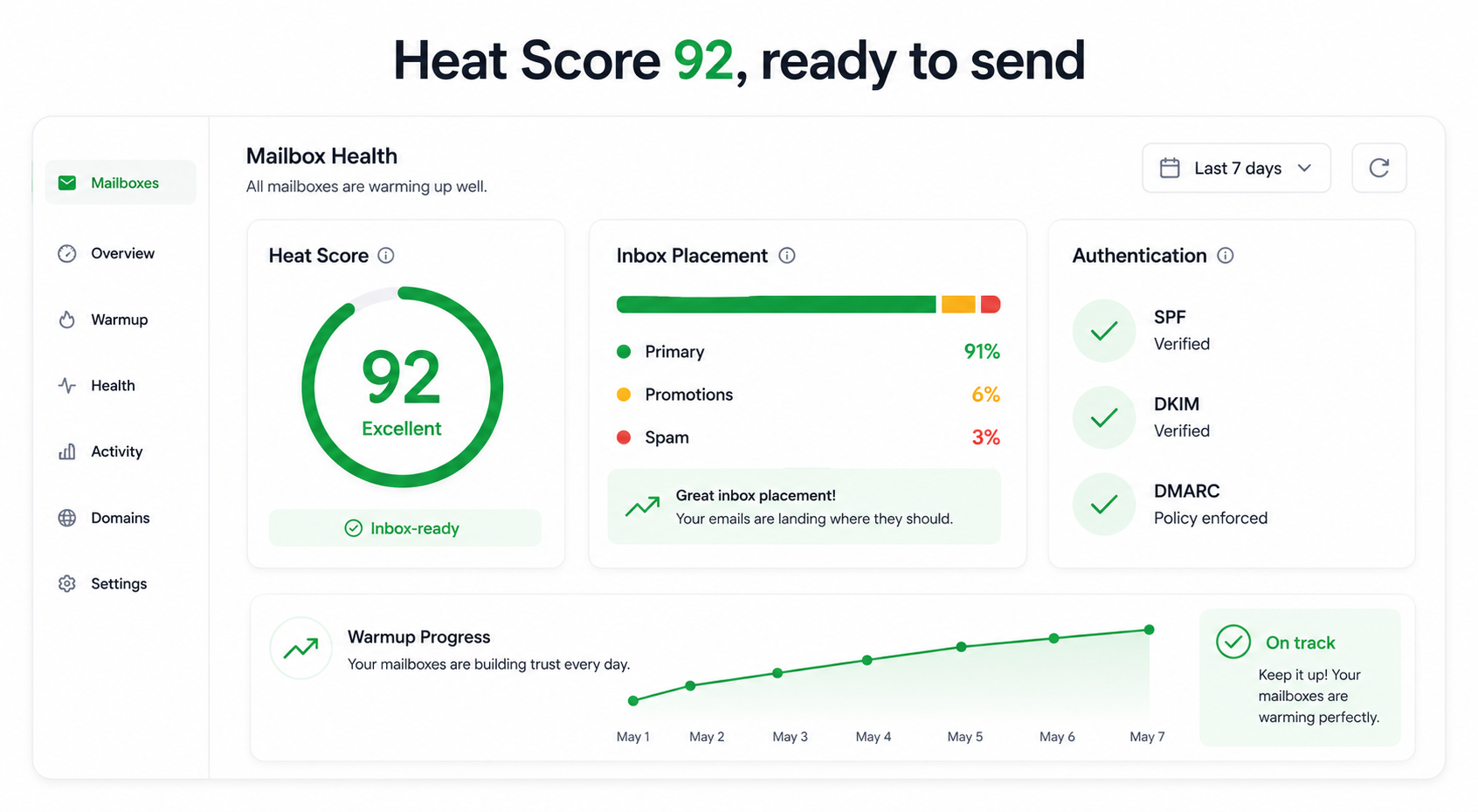
Two signals tell you where you stand. Heat Score™ measures mailbox reputation from 0 to 100, and 85 or higher means you are ready to send.
Inbox placement tests show where your mail actually lands across Google, Outlook, and others, so you know if you are hitting the primary tab or the spam folder.
Run placement tests before you launch and again whenever a campaign dips. A free inbox placement test is a fast way to sanity-check a mailbox.
Reputation decays, so warmup is a habit, not a one-time setup.
Once real campaigns start, keep a low level of warmup running underneath them. It offsets the natural hit that cold sending puts on your reputation.
Watch your Heat Score™ weekly. If it slips, ease off cold volume and let warm-up rebuild the mailbox before you push again.
Health checks on your DNS, MX, and blacklist status catch problems early, before a broken record quietly sinks a domain. Pair warmup with ongoing email deliverability monitoring so nothing drifts unnoticed.
Most deliverability problems trace back to a short list of avoidable errors.
Both can work, but they suit very different senders.
For anything beyond a single inbox, automated warmup wins on every axis that matters.
If you send it through Salesforge, warm-up stops being a separate chore and a separate bill.
Here is the part that changes the math. Every mailbox you connect to Salesforge is warmed automatically through Warmforge, at no extra cost and with no slot limits.
The warmup itself is premium. Warmforge runs one-click AI warmup on a curated pool of aged Google Workspace and Microsoft 365 mailboxes, so the activity reads as genuine to inbox providers. The warmup emails are written by AI across multiple languages, which keeps the traffic natural for senders targeting more than one region.
You get the measurement in the same place. Heat Score™ tracks each mailbox from 0 to 100. Inbox Placement Tests show exactly where your mail lands across the major providers. Health Checks monitor SPF, DKIM, DMARC, MX records, and blacklist status, and alert you before a problem spreads.
It also connects to the rest of your sending. Warmforge warms Google and Outlook mailboxes directly, plus IMAP and SMTP mailboxes from Mailforge and Infraforge.
Warmup is only one layer of deliverability inside Salesforge. Dynamic ESP matching routes each send to match the recipient's provider. Sender rotation spreads volume, so no single mailbox burns out. Bounce Shield pauses risky sends before they hurt your reputation. Built-in email validation and text-only sending keep bounce rates and spam signals low.
And it is one login for the whole chain. Find leads in Leadsforge, spin up mailboxes on Mailforge, Infraforge, or Primeforge, warm them with Warmforge, and send through Salesforge with Primebox™ handling every reply across email and LinkedIn.
You can run that stack three ways. Your own team operates it, Agent Frank runs it as an autonomous AI SDR, or a Forge Expert agency runs it for you. If you want to compare dedicated warmup tools side by side, this email warmup tools breakdown lines up the options.
Warmup is the cheapest insurance you can buy for a cold email program.
Every deliverability problem I have seen started upstream, at warmup. Get it right and the rest of your outbound gets easier. Skip it and no amount of clever copy saves you.
The 2026 rules reward senders who build reputation patiently and punish the ones who rush. So authenticate first, warm slowly, watch your Heat Score™, and never turn warmup all the way off.
If you would rather not manage warmup as a separate tool, run it where you send. Inside Salesforge, warmup is free, unlimited, and already tracking the numbers that decide whether you land in the inbox.
1. How long should I warm up a new email before sending cold emails?
Plan for at least two weeks on a new Google Workspace or Microsoft 365 mailbox, and three to four weeks for higher volume. The real signal is your Heat Score: once it reaches 85 or higher, the mailbox is ready.
2. Can I send cold emails without warming up first?
You can, but you should not. A brand-new mailbox sending cold volume on day one looks like spam to Gmail, Outlook, and Yahoo, and it usually lands there. Warmup builds the reputation providers look for before they trust your mail.
3. Does email warmup still work in 2026?
Yes, and it matters more than before. With stricter authentication rules and a tight spam-complaint ceiling, a warmed mailbox with a track record of positive engagement is what keeps your cold mail in the inbox.
4. Is manual or automated warmup better?
Automated warmup wins for any real program. It runs every day without effort, uses a large pool of real mailboxes, and gives you a Heat Score and placement data. Manual warmup only makes sense for a single low-volume inbox.
5. How much does email warmup cost?
Standalone warmup tools usually charge per mailbox. With Salesforge, warmup runs free and unlimited through Warmforge on every plan, which removes the per-slot cost most senders pay on top of their sending tool.
6. What is a good Heat Score for sending?
A Heat Score of 85 or higher means the mailbox is healthy and ready for outreach. Below that, keep warming and hold off on cold volume until it climbs.


.jpg)
.png)
