Every deliverability team knows the same brutal truth. A large chunk of the emails you send never reach the inbox. Some studies put it at 1 in 6. The bigger reason is not always what you'd think. It's not your copy, and it's not your subject lines. It's your list.
I've watched founders and SDR leads burn through a month of infrastructure investment because nobody validated the list first. Bounces climb past 5%. Sender reputation collapses. Future emails land in spam, even the ones going to real, engaged people.
If you're running cold outbound at any real volume, email validation matters. It's the difference between a campaign that lands and a campaign that dies.
In this guide, I break down what email validation actually is and how it works under the hood. You'll see when to run it in your outbound flow, and how to pick a tool that fits your setup.
Let's dive in.
Email validation is the process of checking that an email address is real, active, and safe to send to. In practice, it means running a series of quick checks on every address in your list. The checks go from basic format all the way to whether a real mailbox sits behind the address.
The goal is simple. Send only to inboxes that will accept your email. Stay off addresses that will bounce, complain, or blacklist you.
You do not need to run these checks one at a time. A good tool runs them in seconds and returns a clear verdict for every address.
Short answer, mostly.
The two terms get used interchangeably, and for most people, they mean the same thing. But if you want to be precise, there is a small distinction worth knowing.
Email validation is the format check. It confirms the address is syntactically correct, that the domain exists, and that the mailbox looks like it can receive mail.
Email verification goes one step further. It performs an SMTP handshake and actually pings the mail server to confirm the mailbox is live.
Most modern tools do both. When someone says "email validation" or "email verifier," they usually mean the full process. Format check plus mailbox check plus risk detection.
Here's a quick breakdown:
The rest of this guide uses "email validation" as the umbrella term for both. That's how the industry uses it, and how the tools market themselves.
Every good email validation tool runs the same 4 checks in sequence.
Some do a few more risk signals on top, but the core process is the same everywhere.
Here's what happens under the hood.
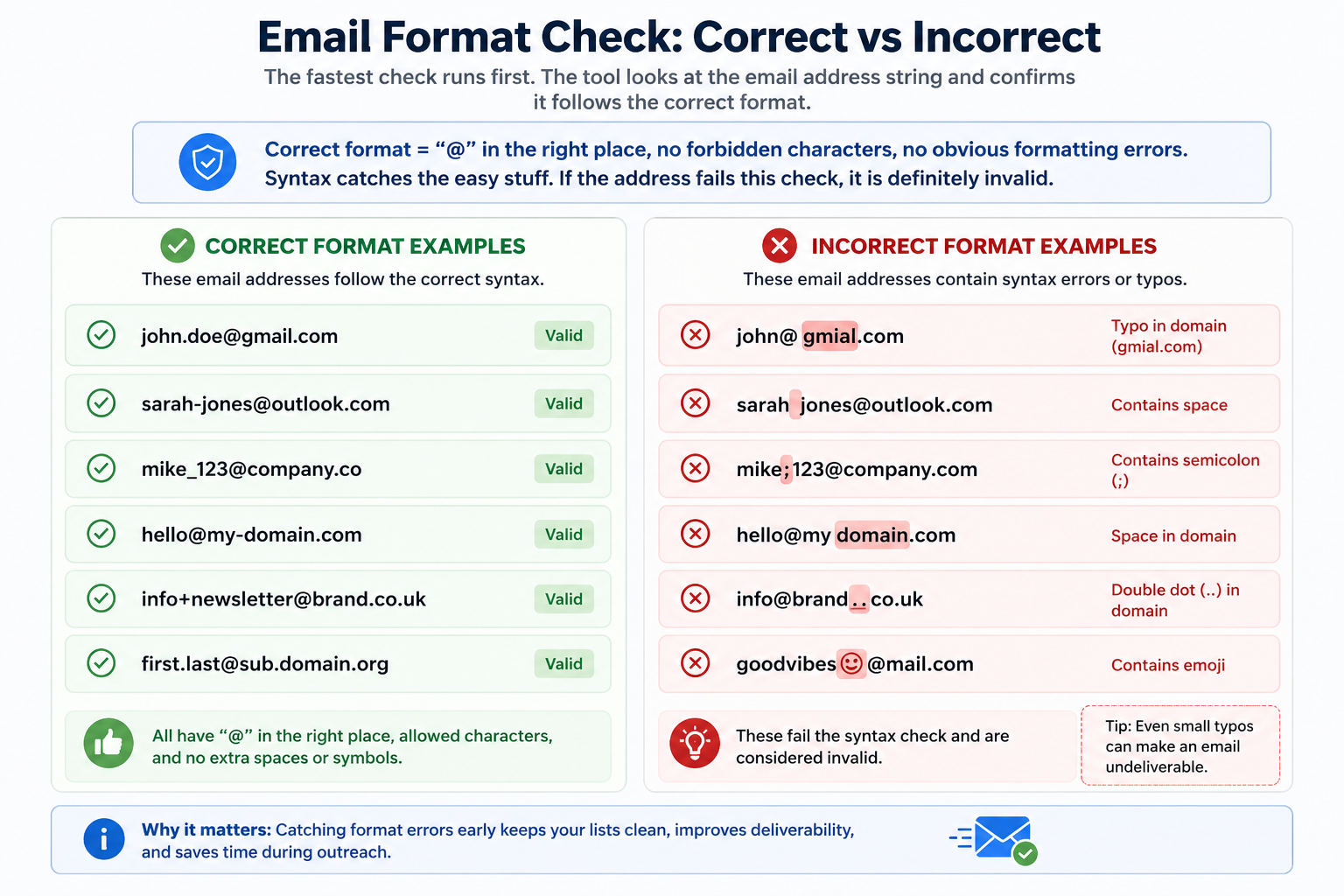
The fastest check runs first. The tool looks at the email address string and confirms it follows the correct format. That means an "@" symbol in the right place, no forbidden characters, and no obvious formatting errors.
Syntax catches the easy stuff. Typos like [email protected], or entries with spaces, semicolons, or emojis. If the address fails this check, it is definitely invalid.
Next up, the domain check. The tool takes the part of the address after the "@" and looks up its DNS records. It confirms two things. The domain exists, and it has an active MX record. The MX record is the mail server that accepts incoming email.
If the domain does not exist or has no MX record, the address will bounce every time. This check filters out dead domains, misspelled companies, and expired websites.
Even if the domain is fine, the specific mailbox might not exist. The tool performs an SMTP handshake with the mail server. Essentially, it asks the server, "Is this mailbox real and active?" The server responds with yes, no, or unclear.
This is where things get interesting. Some servers return an honest yes or no. Others accept everything, which brings us to catch-all detection.
The last layer is where good tools separate from basic ones. Beyond the format and mailbox checks, a solid validator flags several risk categories:
Each signal gets its own flag. The best tools combine these into a single risk score, usually on a 0-100 scale.
Salesforge's free email verifier is a good example. It returns a score in the 90s for safe addresses. Anything below that, and you get a breakdown showing exactly which signals failed. That kind of transparency is what you want.
A binary "valid or invalid" answer tells you nothing about why an address failed.
Skipping validation is the fastest way to a poor sender reputation. And once your reputation drops, every future email pays the price, even the ones going to real, engaged prospects.
Here's what actually happens when you send to an unvalidated list.
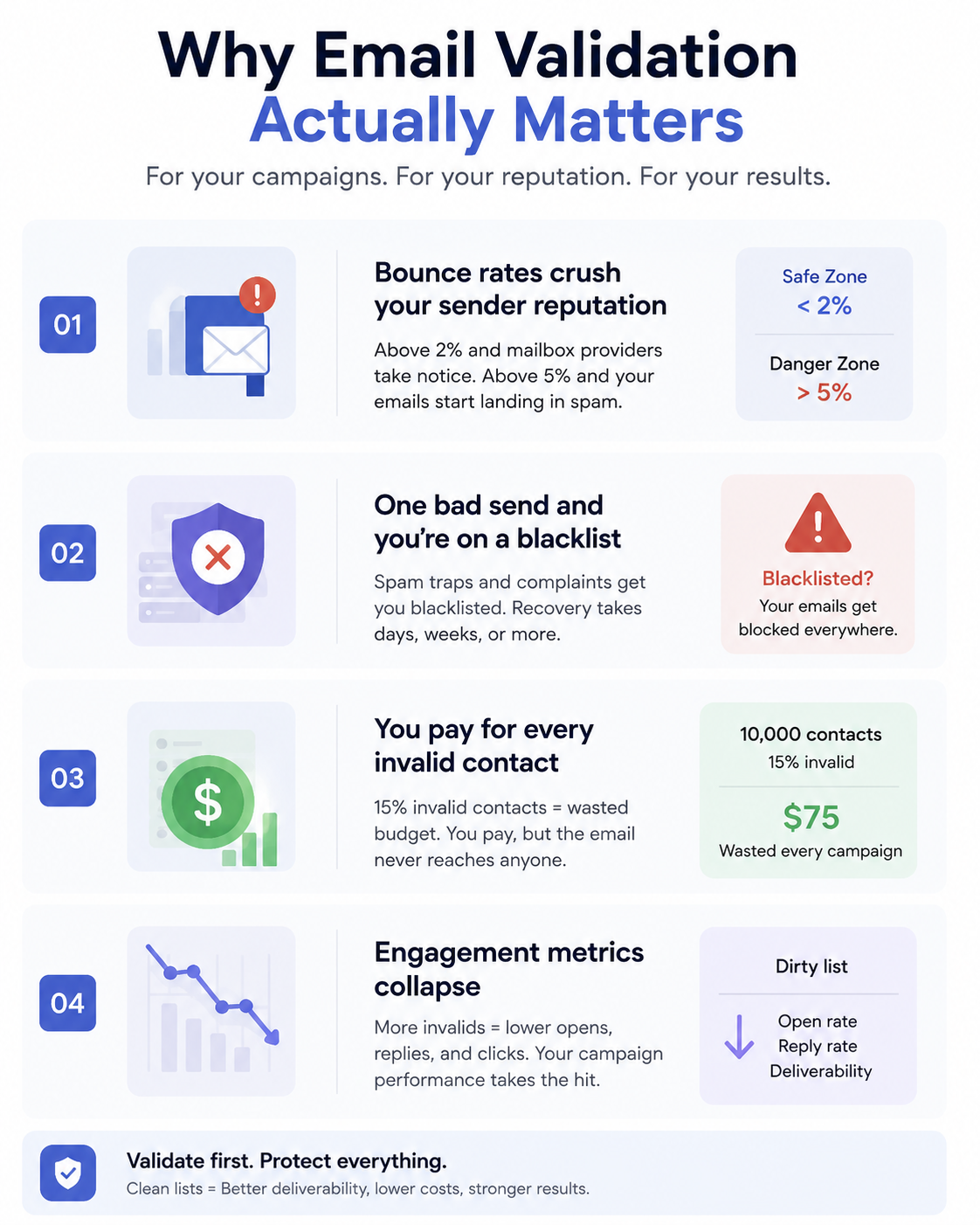
Mailbox providers watch your bounce rate. When it climbs above 2%, they take notice. When it climbs above 5%, they start filtering your emails into spam by default.
Every hard bounce tells Gmail, Outlook, and the rest that you are not maintaining your list. A well-maintained list rarely bounces. A dirty list bounces constantly. The math is that simple.
Blacklists exist to catch spammers. But they are not always fair, and legitimate senders end up on them all the time. All it takes is a spam trap in your list, or a burst of complaints from role-based addresses.
Once you're blacklisted, every email you send from that IP or domain gets flagged. Getting off a blacklist takes days or weeks and often requires a formal removal request. Validation catches the addresses that put you at risk in the first place.
Most email platforms charge per contact or per send. If 15% of your list is invalid, you are paying to send emails that will never land. On a 10,000-contact list at $0.005 per send, that's $75 wasted every campaign, just from invalid addresses.
The bigger cost is opportunity. Every send to a bad address is a send you could have made to a real prospect. Multiply that across a year of campaigns, and the math gets ugly fast.
Even if you avoid the reputation and blacklist hits, unverified lists tank your engagement numbers. Open rates drop because half your sends never reach the inbox. Reply rates drop because you're messaging inactive accounts. Meeting-booked numbers drop as a direct result.
That kills your ability to measure what's working. You can't tell if your subject lines are broken or your list is broken. So you end up rewriting a copy that was fine to begin with.
If you want a deeper look at how invalid emails specifically damage cold outreach, I broke that down in this piece on the hidden risks of unverified emails.
There are 4 ways to validate an email address, and each one solves a different problem. Most teams use a combination.
Real-time validation happens at the point of entry. Someone fills out a form on your site. Or an SDR adds a lead in your CRM. Or an API call pushes a new contact into your system. Before the address gets saved, an API call runs the checks and returns a verdict in less than a second.
This is the strongest defense against bad data. If the address fails, you catch it before it ever enters your list. The tradeoff is that you need to build the integration, or use a platform that has it native.
Bulk validation runs after data is already in your system. You upload a list of thousands of addresses, and the tool works through them in the background, flagging the bad ones. This is how most teams clean up an old CRM. Or an imported list from a purchased database, or a stale export from an outdated sequence.
Bulk validation is reactive. It fixes what is already broken. Real-time validation is proactive, and stops the problem at the source.
Regex is a pattern-matching technique that lives on the frontend. It runs in the browser, checks the address format, and rejects obvious typos. Every signup form has some flavor of regex validation baked in.
The problem is that regex only checks format. It cannot tell you if the domain exists, if the mailbox is real, or if the address is a spam trap. It's a floor, not a ceiling. Use it, but do not trust it as your only line of defense.
Double opt-in is the old-school confirmation email flow. Someone submits an address, you send a confirmation email, and they click a link to prove the address is real. If they click, the address is valid and consented. If they don't, the address never enters your list.
Double opt-in works. But it also has a drop-off. Some people never confirm, even if the address is real and they meant to sign up. For cold outbound specifically, double opt-in is not an option, since you're reaching people who never opted in to begin with.
Which combination to use: For most outbound teams, real-time validation plus bulk cleaning is the right stack. Real-time catches new addresses as they come in. Bulk catches the drift over time as your list ages and mailboxes decay.
For a deeper walkthrough of how validation directly improves deliverability across a full outbound stack, I covered it here: How Email Validation Improves Deliverability.
Validation runs at 4 checkpoints in a well-built outbound flow. Skip any of them and bad addresses find their way in.
The earliest point to catch bad data is when it enters your world. If you source contacts from a lead database like Leadsforge, validation happens during the enrichment pass. Waterfall enrichment pulls from multiple sources and validates each result before showing it to you.
The advantage here is that bad addresses never make it into your CRM in the first place. That's the cleanest possible defense.
Any address entering your system through a form should get validated in real time. That includes signup forms, demo request forms, gated content downloads, and any workflow where a lead types in their own address.
Real-time API validation at the form level catches typos before they become bounce statistics. It also blocks disposable emails and bot signups automatically.
Before you launch any cold outreach campaign, run a bulk validation on the list. This is the last line of defense before the send. Even if you validate at capture, addresses go stale. Job changes, deactivated mailboxes, and domain shutdowns happen constantly.
A pre-launch scrub takes less than an hour on a 10,000-contact list. It can save you from a reputation hit that takes weeks to recover from.
Even a validated list decays. Industry data suggests roughly 20-30% of B2B contact data goes bad each year. That means running quarterly validation on your active lists is not optional. It's required maintenance.
For high-volume senders, monthly is better. For anyone sending 50+ emails per mailbox per day, weekly checks on a sample of your list will catch problems before they scale.
If you want to see how bad addresses specifically create spam trap problems downstream, this post breaks it down: how email validation helps avoid spam traps.
Sometimes you just need to check one address, and you don't want to build an API integration for it.
Here's how to do a manual gut-check on any email, and where to go when the manual check isn't enough.
Scan the address. Does it have an "@" symbol? Any spaces, semicolons, or emojis? Any obvious typos like gmial.com or hotmial.com? These are the easy ones and take 2 seconds to spot.
If the address looks like john,doe@company with a comma instead of a period, or missing a domain extension, you have your answer already.
Type the part after the "@" into your address bar. Does the website exist and load properly? Is it an active company site or a parked domain? A dead domain means a dead mailbox, period.
You can also do a quick WHOIS lookup to see when the domain was registered and whether it's still active. If a domain was registered last week and looks generic, be careful.
Manual checks catch the obvious stuff. But they miss catch-all domains, disposable providers, spam traps, and inactive mailboxes on legitimate domains.
For any address you're actually about to send to, run it through a proper verifier. The Salesforge free email verifier runs 8 signal checks in seconds and returns a score from 0 to 100. Anything in the 90s is safe. Below that, you get a breakdown showing exactly which signals failed and why.
The free version covers 10 addresses per month. That's enough for one-off manual checks. For campaign-scale verification, you validate in bulk inside Salesforge.
That's the practical difference between the two. Single addresses go through the free tool. Full lists go through the app.
Not every email verifier is worth paying for. Here's what to check before you commit to one.
The tool should publish its accuracy methodology and hit at least 95%. Anything below that leaves you exposed. Ask specifically how they measure it, because "99% accuracy" claimed without a methodology is a marketing number, not an engineering one.
Binary valid/invalid results tell you nothing about why an address failed. A score, especially one broken down by signal, lets you set your own risk threshold based on how aggressive your sending is.
Any decent tool detects catch-all domains and disposable providers. These are the two biggest risk categories after invalid addresses. If a tool marks these as "valid" without flagging the risk, walk away.
Spam traps are the single fastest way to a blacklist. A tool that identifies known spam trap addresses saves you from the worst downstream damage. This is one area where cheaper tools cut corners, so check specifically.
If you're validating a large list, speed matters. Check the tool's API rate limits. Some cap at 7 requests per second, which is fine for small batches but breaks down at 100K+ contacts. Look for something that scales.
Standalone verifiers create friction. Every contact has to leave your sending tool, get validated, come back, and get re-uploaded. Native validation inside your outreach platform removes all that. Fewer moving parts, fewer failure points.
Watch out for tools that charge per verification and let costs compound quietly. The best pricing models bundle validation credits into your sending plan, so you never think about it at the per-check level.
For cold outbound specifically, standalone verifiers create friction that adds up fast. Every new lead has to leave your sequence tool, get validated somewhere else, come back, and get re-uploaded. That's fine at 100 leads a week. It falls apart at 10,000.
Native validation inside your sending platform removes all of that. Validation runs automatically as leads enter your sequences, without any manual step. Bounces get caught before the send. Risky addresses get flagged with a score before you commit to messaging them.
That's the model Salesforge runs on. Every contact in a sequence gets validated before the first email goes out, whether you run outreach yourself or hire Agent Frank as your AI SDR to run it for you. The free verifier tool uses the same 8 signal checks that scale up inside the app for full-list verification. Same engine, same score, same standards, from one address to 100,000.
The Forge stack takes it a step further. Your source leads in Leadsforge with validation baked into the waterfall enrichment. You warm your mailboxes in Warmforge to build sender reputation before you ever hit send. Then Salesforge sends the sequence with real-time validation on every contact.
That's the full picture. Validation is not a separate tool you bolt on. It's a layer that lives inside every step of the outbound flow.
If you want to compare Salesforge against the standalone verifiers head-to-head, I covered the top options here: 6 Best Email Verification Tools for 2026.
These are the 5 rules I follow across every campaign, regardless of tool or industry.
B2B contact data decays fast. Somewhere between 20-30% of your list goes bad each year. If you send infrequently, quarterly cleaning keeps the list workable. If you send 500+ emails per day per mailbox, run cleaning monthly. High volume senders lose more addresses per cycle, so they need to catch drift faster.
Real-time validation at the form or CRM level is what stops bad data from entering in the first place. It's cheaper and cleaner than bulk cleaning after the fact. If you skip it, you're always playing catch-up.
Catch-all domains accept every email that hits their server. That means an address might look valid but the mailbox never gets read. Some validation tools mark catch-alls as "valid," which is misleading. Treat them as risky by default. If you send to them, do it after your core list is engaged, not in the first send.
Role-based addresses like info@, sales@, and support@ get filtered by teams of people. Anyone on that team can mark you as spam. The unsubscribe rate is higher and the reply rate is lower. Unless you have a specific person you're trying to reach through a shared inbox, skip them.
Validation keeps your bounces down. Warmup builds your sender reputation. Doing one without the other leaves you exposed. Warmforge handles the warmup side of the Forge stack. Every mailbox connected to Salesforge gets warmed automatically at no extra cost.
For a full deliverability playbook that includes validation, warmup, and infrastructure, I put together a broader guide at the Salesforge email deliverability hub.
Email validation is the cheapest deliverability investment you can make. A clean list protects your sender reputation, keeps your bounce rate low, and gives your emails a fair shot at the inbox.
The one habit change that matters most is this. Validate before every send. Not just when you remember. Not just when things go wrong. Every send.
If you're running cold outbound, native validation inside your sending platform beats any standalone verifier on friction and cost. Salesforge builds validation into every sequence, along with unlimited warmup through Warmforge and infrastructure through Mailforge, Infraforge, and Primeforge. The full outbound stack, connected.
Try Salesforge free. See how validation, warmup, and multichannel sequences work together, without stitching a stack of standalone tools.
The two terms mostly mean the same thing. If you want to be precise, validation checks the address format and domain existence, while verification confirms the mailbox is live and can accept mail. Modern tools do both, and most vendors use "validation" and "verification" interchangeably in their marketing.
Good validation tools hit 95-99% accuracy. The exact number depends on how the tool measures, and how much of your list is made up of tricky categories like catch-all domains. No tool hits 100% because email is a moving target, and mailboxes change constantly. Look for tools that publish their methodology, not just the headline number.
Yes. Salesforge offers a free email verifier that runs 8 signal checks and returns a 0-100 score. The free tier covers 10 addresses per month, which is plenty for one-off manual checks. For bulk verification across full lead lists, you validate inside a paid tool or platform.
Quarterly at minimum. Monthly if you send 500+ emails per day per mailbox. Always run a fresh validation before launching a new campaign. And validate every new contact as it enters your system, not just at cleanup time.
No. Validation protects your bounce rate and sender reputation, which are two of the biggest factors in inbox placement. But inbox placement also depends on your warmup, your infrastructure, your content, and your engagement history. Validation is necessary but not sufficient on its own.
A catch-all domain accepts every email address, even ones that don't have a real mailbox behind them. That means the address might look valid to a verifier but goes to a black hole. Treat catch-alls as risky. Send to them only after your primary list is engaged and warmed up, and monitor bounce and complaint rates closely.
The best tools flag known spam trap addresses. But no tool catches every trap, because ISPs create new ones constantly. That's why validation alone is not enough. Combine it with proper warmup, ongoing list hygiene, and monitoring your bounce and complaint rates for early warning signs.
.jpg)

.jpg)
.jpg)


